Vencru AI-Assisted Bank Reconciliation
Designing Vencru’s first AI-assisted bank reconciliation experience for small businesses
PROJECT DETAILS
Role
Product Designer
Team
1 Product Designer • 1 Product Owner • 1 Frontend Developer • 3 Backend Developers
Scope
End-to-end reconciliation workflow
Timeline
Jan 2026 - Feb 2026
Platform
Web

Reconciliation page for bank accounts
Overview
I led the end-to-end product design for Vencru’s reconciliation system, helping small business owners and accountants reconcile transactions directly inside the platform instead of relying on fragmented spreadsheet workflows.
The experience introduced AI-assisted transaction matching, partial reconciliation workflows, and guided financial decision-making while keeping the system approachable for non-accounting users.
The Problem
Before this project, Vencru users had no built-in reconciliation workflow.
Business owners and accountants were leaving the platform to manually reconcile transactions using spreadsheets, external accounting tools, or manual journal entries.
This created several operational problems:
Reconciliation workflows became fragmented across multiple tools
Duplicate financial records were common
Transactions were sometimes missed entirely
Manual reconciliation consumed significant time each month
Small business owners without accounting expertise struggled to confidently reconcile records
Users increasingly requested reconciliation support as the platform matured
The lack of reconciliation functionality also created a business risk for Vencru.
As competitors offered more complete accounting workflows, users expected reconciliation to exist directly inside the product instead of relying on external processes
Key Goals
We wanted to:
01
Reduce manual reconciliation time by at least 50%
02
Introduce AI-assisted matching to reduce repetitive work
03
Improve accuracy by reducing duplicate or missed records
03
Improve accuracy by reducing duplicate or missed records
Also to:
Help users confidently resolve discrepancies
Keep complex accounting workflows approachable for non-accounting users
Increase product adoption and retention by keeping reconciliation inside Vencru
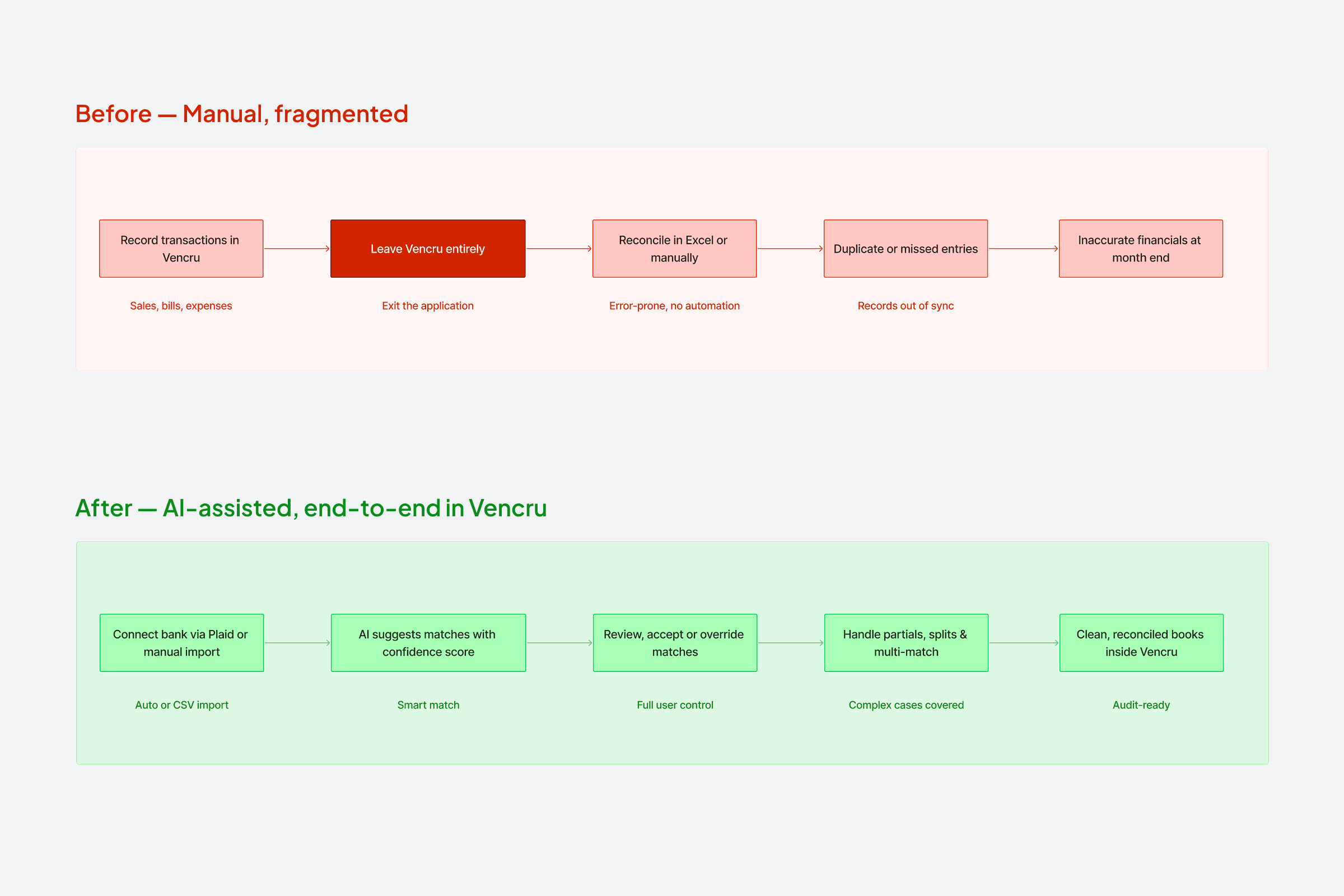
Simple “before vs after” workflow comparison
My Role
I led the end-to-end UX design for Vencru’s reconciliation experience.
My responsibilities included:
Designing the full reconciliation workflow from account connection to transaction resolution
Defining reconciliation states and interaction behaviors
Designing AI-assisted transaction matching experiences
Simplifying complex accounting concepts for SMB users
Structuring multi-record and partial reconciliation flows
Collaborating closely with engineers on reconciliation logic and edge cases
Creating implementation annotations and interaction documentation
Conducting implementation QA during development
Helping prioritize and de-scope features to keep the MVP focused and usable
The Core Design Challenge
The biggest challenge was balancing accounting flexibility with simplicity. Bank reconciliation is operationally complex. Users may need to:
Match one bank transaction to multiple records
Reconcile partial amounts
Resolve discrepancies
Handle duplicate records
Understand transaction states
Trust AI suggestions without losing control
At the same time, Vencru primarily serves small businesses, many of whom are not accounting experts.
The challenge was not simply building reconciliation. It was designing a workflow that helped users confidently make financial decisions without overwhelming them with accounting complexity.

Edge-case and idea exploration screenshots
Designing the Reconciliation System
Creating a Clear Transaction Workspace
The reconciliation experience centered around a transaction table designed for high-volume financial scanning. Each connected bank account displayed:
Vencru account balance
Bank statement balance
Remaining difference
Number of unreconciled transactions
This gave users immediate visibility into reconciliation progress before reviewing individual records. Below the summary, users could:
Search transactions
Filter by reconciliation state
Sort by transaction data
Review transaction statuses at scale
The transaction states included:
Reconciled
Unreconciled
Partially reconciled
Flagged
Excluded
These states became critical to helping users understand what required action.

Before/after exploration concepts of the reconciliation page
Why We Avoided Inline Reconciliation Actions
One of the biggest interaction decisions was avoiding inline reconciliation actions directly inside the transaction table.
Instead, selecting a transaction opened a contextual side panel.
We intentionally chose this approach because reconciliation required:
More transaction context
AI suggestion visibility
Partial reconciliation visibility
Multiple action paths
Reduced cognitive overload
Keeping actions inline would have made the table visually dense and significantly harder to scan.
The side panel allowed us to progressively reveal complexity only when users needed it.

Side panel reconciliation flow
AI-Assisted Matching
To reduce repetitive manual work, we introduced AI-assisted transaction matching. When users selected a transaction, the system surfaced suggested matches inside the side panel.
Suggestions considered:
Transaction amount
Client or vendor names
Payment status
Historical reconciliation behavior
Matching transaction timing
Each suggestion included:
Suggested matching record
Transaction details
Confidence score
Relevant payment status
Users could:
Accept and reconcile
Ignore suggestions
Search manually
Create a new transaction
Override AI recommendations entirely
This approach helped reduce reconciliation effort while still preserving user control.
We intentionally avoided fully automated reconciliation because financial workflows require trust, verification, and flexibility.
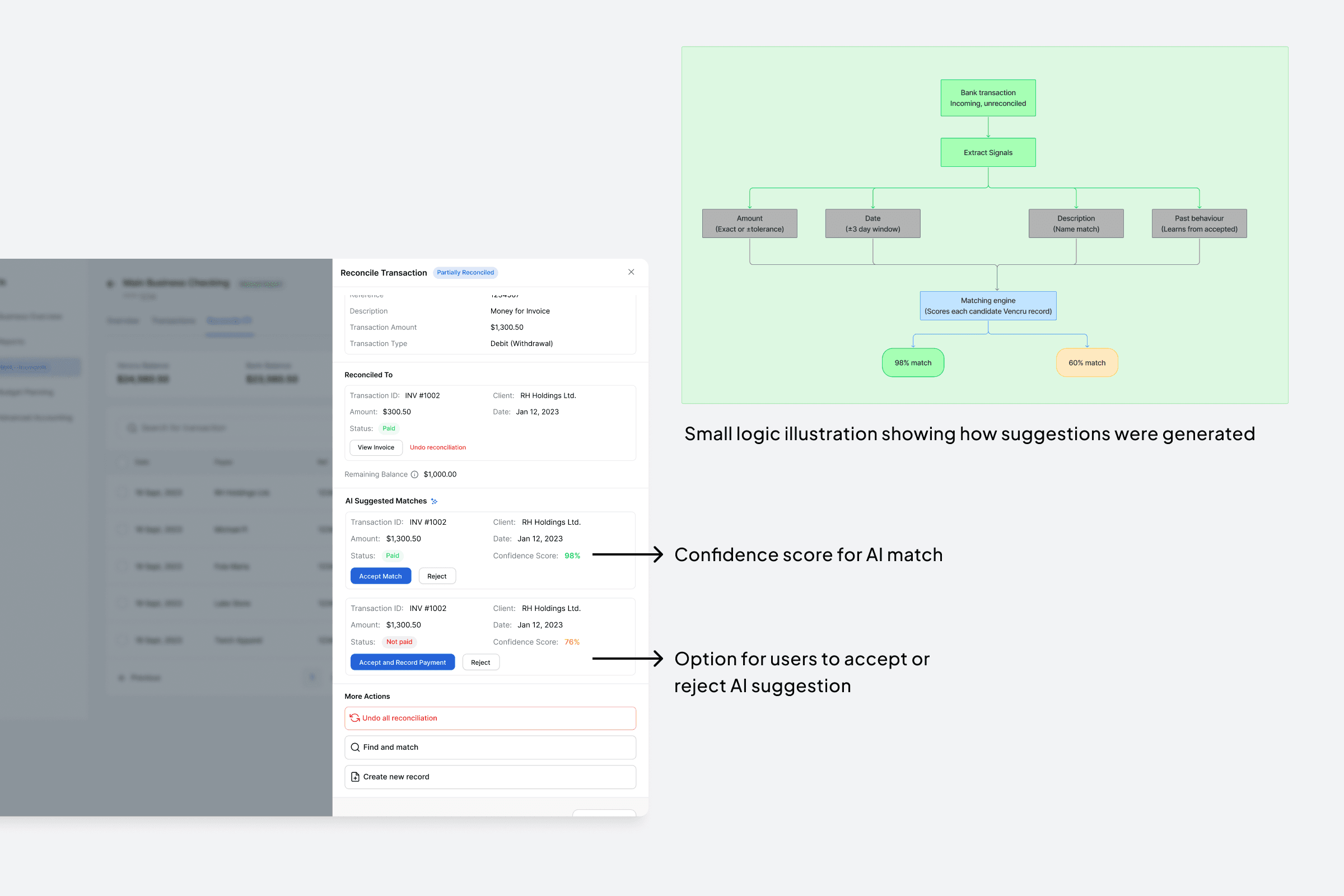
AI suggestion flow and page
Solving Partial & Multi-Record Reconciliation
This became one of the most complex parts of the experience. Users often needed to:
Match one bank transaction to multiple Vencru transactions
Match one Vencru transaction to multiple bank transactions
Reconcile only part of a transaction amount
Continue reconciliation later without losing progress
The challenge was not only functional. It was making these workflows understandable. A major part of the design effort focused on simplifying language, interaction patterns, and transaction visibility.
We iterated heavily on:
reconciliation terminology
transaction clarity
amount visibility
user feedback states
remaining balance communication
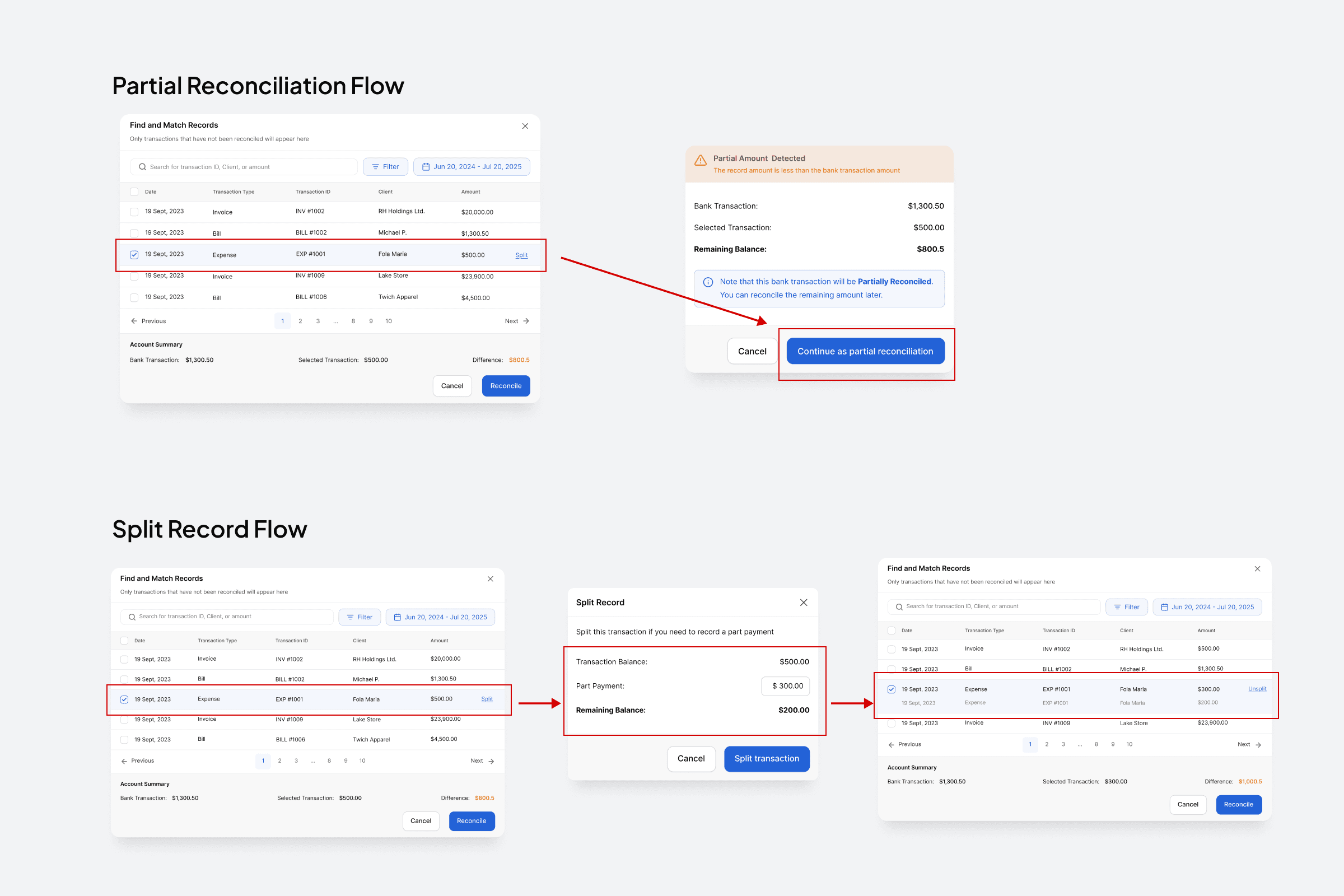
Partial reconciliation and split record flow
Designing Partial Reconciliation Visibility
When users partially reconciled a transaction, the interface clearly displayed:
Which transaction had already been matched
The reconciled amount
The remaining balance still unresolved
For example:
Bank transaction total: $150
Reconciled amount: $100
Remaining amount: $50
Instead of forcing users to complete reconciliation immediately, the system preserved the unresolved amount while marking the transaction as partially reconciled.
This helped users continue complex reconciliation workflows over time without losing context.
States, Edge Cases & System Thinking
Reconciliation workflows are heavily state-dependent. To ensure clarity across the experience, I designed a system of transaction states that helped users understand:
what required attention
what had already been resolved
what remained incomplete
what had intentionally been excluded
The system included:
Reconciled
Unreconciled
Partially reconciled
Flagged
Excluded
Connected bank accounts
Manually imported accounts
These states influenced:
filtering behavior
transaction visibility
reconciliation actions
progress tracking
AI matching behavior

Collaboration & Implementation
This project required close collaboration between design and engineering due to the complexity of reconciliation logic.
Throughout implementation, I worked directly with engineers to:
review flows
clarify edge cases
define interaction behaviors
align on reconciliation logic
simplify technical complexity where needed
I also created detailed implementation annotations to guide development and reduce ambiguity during handoff.
During development, I conducted QA reviews to ensure the shipped experience aligned with the intended workflows and interaction behaviors.

Design notes and annotations added when designing and reviewing
Outcomes & Impact
The reconciliation experience launched successfully as part of Vencru’s accounting workflow expansion.
After launch:
Users could reconcile transactions directly inside Vencru for the first time
Manual reconciliation effort was significantly reduced
The platform reduced dependency on external spreadsheet workflows
Users gained a more centralized financial workflow experience
The project also strengthened Vencru’s accounting capabilities and improved product competitiveness within the SMB accounting space.
Reflection
This project fundamentally changed how I think about operational product design. I learned that designing financial workflows is not only about functionality. It is about helping users confidently make high-risk decisions.
One of the biggest lessons from this project was understanding how much clarity, terminology, and state visibility influence trust inside financial products.
I also gained deeper experience in:
systems thinking
edge-case design
AI-assisted workflows
implementation collaboration
simplifying operational complexity
Looking back, one of the decisions I’m most proud of was simplifying partial and multi-record reconciliation workflows without overwhelming users.
The project reinforced the importance of progressive disclosure, guided interactions, and maintaining user control in AI-assisted systems